What Are Shopify Functions? Merchant Guide
If you’ve been evaluating Shopify apps recently, you’ve probably seen the phrase “powered by Shopify Functions” in app descriptions. But what does that actually mean for you as a merchant? And why should you care? This guide explains Shopify Functions in plain language, without the developer jargon.
What Are Shopify Functions?
Shopify Functions are small pieces of code that run directly on Shopify’s servers. They let apps customize core parts of the Shopify platform, like how discounts are calculated, how shipping options are displayed, or how payment methods are filtered at checkout.
The key difference from traditional apps: Shopify Functions run on Shopify’s infrastructure, not on the app developer’s servers. This is a fundamental shift in how Shopify apps work.
Think of it this way: instead of an app saying “hey Shopify, give this customer 15% off” through an API call (which adds latency), the app installs a tiny program directly into Shopify’s checkout engine that says “when a customer with the tag VIP checks out, reduce prices by 15%.” The logic runs in milliseconds, right where the transaction happens.
How Did Apps Work Before Shopify Functions?
Before Shopify Functions, apps had two main approaches to customizing Shopify:
The JavaScript Injection Approach
Many apps would inject JavaScript into your storefront theme. For example, a wholesale pricing app might:
- Load a JavaScript file on every product page
- Check if the current customer has a wholesale tag
- Modify the displayed price in the browser
- Apply a discount code at checkout via script
This approach had serious problems:
- Performance: extra JavaScript means slower page loads
- Reliability: theme updates could break the injected code
- Security: the pricing logic was visible in the browser. A savvy buyer could inspect the code and find your wholesale margins
- Bypassability: browser-side discounts could be circumvented
The API/Webhook Approach
More sophisticated apps used Shopify’s API and webhooks to apply discounts. This was more reliable than JavaScript injection, but still added latency because every discount calculation required a round-trip to the app developer’s server.
If the app’s server went down, discounts stopped working. If the server was slow, checkout was slow.
What Makes Shopify Functions Different?
(For full technical specifications, see the Shopify Functions API documentation).
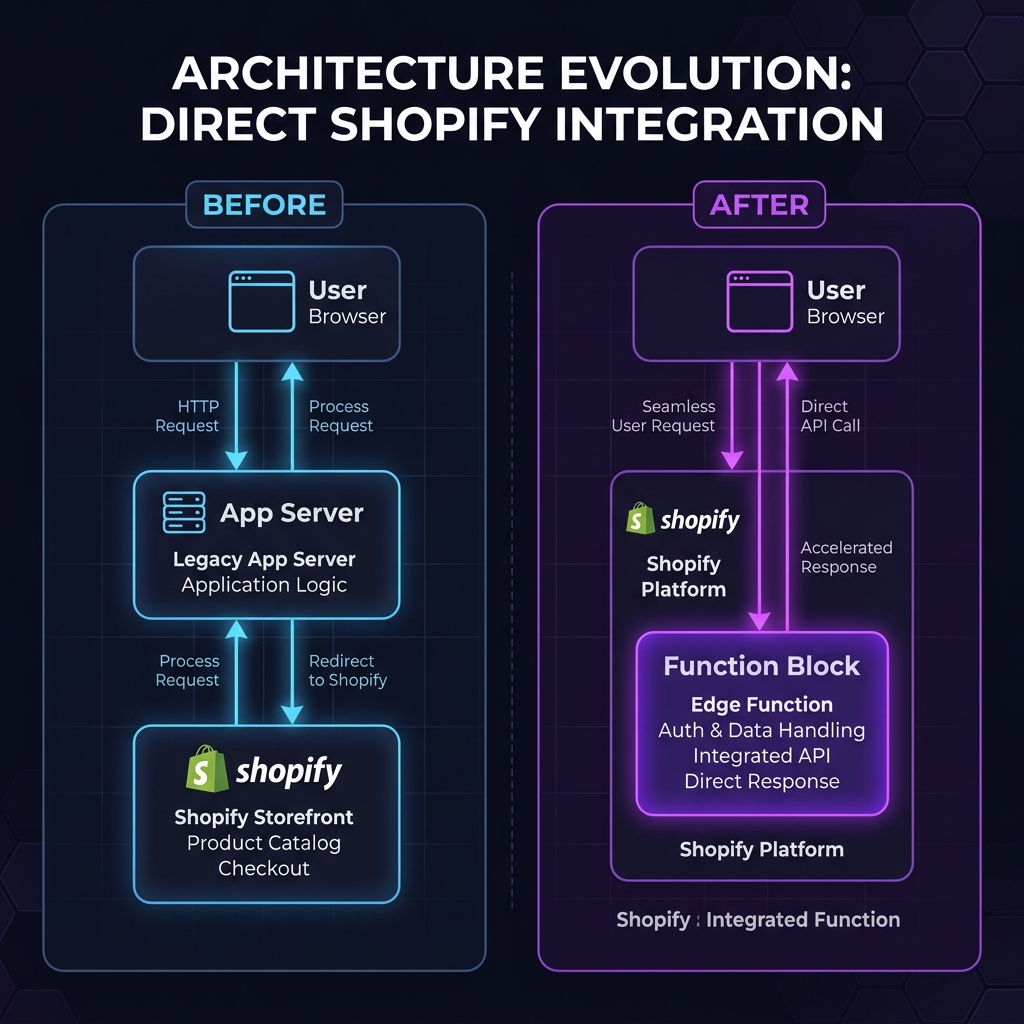
Shopify Functions solve all of these problems by moving the logic to Shopify’s own infrastructure:
| Aspect | Traditional App | Shopify Functions App |
|---|---|---|
| Where code runs | App developer’s server or browser | Shopify’s servers |
| Performance impact | Adds latency (network requests) | Near-zero (runs in <5ms) |
| Theme dependency | Often breaks with theme updates | Completely theme-independent |
| Security | Logic exposed in browser | Logic hidden on server |
| Reliability | Depends on app’s uptime | Runs on Shopify’s infrastructure |
| Checkout integration | Limited (workarounds needed) | Native checkout integration |
Shopify Functions process over 29 billion executions per month across the platform (Shopify Editions 2025). They’re battle-tested at scale.
What Can Shopify Functions Customize?
Shopify Functions currently support these extension points:
Discounts
Create custom discount logic that goes beyond Shopify’s built-in discount types. This is how apps like Wezy apply wholesale pricing, customer-specific discounts, and volume-based pricing at checkout.
Shipping
Customize, rename, reorder, or hide shipping options based on cart contents, customer tags, or other conditions. For example, hide express shipping for wholesale orders over a certain weight.
Payment
Show, hide, or reorder payment methods at checkout. For instance, hide “Cash on Delivery” for new customers or show “Net 30” only for tagged B2B accounts.
Cart and Checkout Validation
Add custom validation rules to the cart or checkout. Enforce minimum order quantities, restrict certain product combinations, or validate B2B-specific requirements.
Order Routing
Control how orders are routed to fulfillment locations based on custom logic.
Fulfillment Constraints
Define rules about which locations can fulfill specific items.
Why Should Merchants Care About Shopify Functions?
As a merchant, you don’t need to understand how Shopify Functions work under the hood. But you should know what to look for when choosing apps:
1. Performance
Apps built on Shopify Functions add zero JavaScript to your storefront. This means no impact on your Core Web Vitals, page load speed, or Google rankings. In an era where page speed directly affects conversion rates and SEO, this matters.
2. Reliability
Since the logic runs on Shopify’s infrastructure, it doesn’t depend on a third-party server being online. Your wholesale discounts work even if the app developer’s website is temporarily down.
3. Security
Your pricing logic and business rules are never exposed to the browser. Customers cannot inspect, modify, or bypass server-side discount calculations.
4. Checkout Compatibility
Shopify Functions are the only way for apps to integrate with Shopify’s modern checkout (Checkout Extensibility). If you’ve migrated to Checkout Extensibility (or plan to), you need apps that support Shopify Functions.
How to Tell If an App Uses Shopify Functions
When evaluating apps on the Shopify App Store, look for these indicators:
- The app description mentions “Shopify Functions” or “server-side discounts”
- The app works at checkout rather than just modifying the storefront display
- The app doesn’t require adding custom code or script tags to your theme
- Reviews mention that the app doesn’t slow down the store
You can also check the app’s permissions. Shopify Functions apps will request the “Discount” or “Checkout” function extension scopes.
Frequently Asked Questions
Do Shopify Functions cost extra?
No. Shopify Functions are part of the Shopify platform. App developers choose whether to build with them. As a merchant, you pay for the app subscription, not for Functions usage.
Can I use multiple apps with Shopify Functions?
Yes. Multiple Shopify Functions can run simultaneously without conflicts. Shopify’s checkout engine processes all active Functions in sequence. For example, you can have one app handling wholesale discounts and another handling shipping customization.
Do Shopify Functions work with all themes?
Yes. Since Shopify Functions run on the server (not in the browser), they’re completely independent of your theme. They work with Dawn, third-party themes, custom themes, and headless setups.
What if I switch themes? Will my Functions-based app still work?
Absolutely. Theme changes have zero impact on Shopify Functions. This is one of their biggest advantages over traditional JavaScript-based apps.
What’s Next?
- See Shopify Functions in action with our wholesale pricing setup guide
- Learn how to sell wholesale on Shopify with a complete strategy
- Compare Shopify’s native B2B vs apps for your store
- Explore 5 pricing strategies that leverage Shopify Functions
- Discover RFQ vs fixed pricing for high-value B2B orders