How to Set Up Wholesale Pricing on Shopify (2026)
The quickest way to set up wholesale pricing on Shopify is to define who qualifies, choose the products the rule applies to, set the discount, and test the buyer experience before launch. With Wezy Wholesale & Volume B2B, those rules can target customer tags or logged-in buyers and use Shopify Functions for the discount calculation.
Wholesale pricing setup at a glance
- Install Wezy Wholesale & Volume B2B.
- Enable the app embed so eligible buyers can see their pricing on product pages.
- Create a wholesale rule and choose the customer group.
- Set the products, percentage discount, and optional minimum order conditions.
- Test the rule with an eligible customer before making it part of your B2B workflow.
What Are Shopify Functions and Why Do They Matter for Wholesale?
Shopify Functions let apps run custom backend logic during key commerce flows such as cart and checkout. Shopify’s documentation describes Functions as code that Shopify invokes to calculate discounts and other commerce logic, rather than logic that depends only on storefront JavaScript.
For Wezy, the practical split is:
- Discount calculation: handled through Shopify Functions in Shopify’s backend.
- Price presentation: the app embed can show eligible buyers their wholesale pricing on product pages.
- Merchant configuration: rules are managed from the app dashboard without editing theme code for the discount logic itself.
This matters because the pricing rule is not calculated by a browser-side script alone. The storefront widget and your theme can still affect how pricing is displayed, so it is more accurate to separate backend discount logic from frontend presentation.
For technical details, see Shopify’s official guide to Shopify Functions.
Step 1: Install the App
Head to the Shopify App Store and click Install. The app requires zero theme modifications and works out of the box with Checkout Extensibility.
Installation takes about 30 seconds. Once installed, Wezy automatically registers its Shopify Function, so there’s no manual configuration needed.
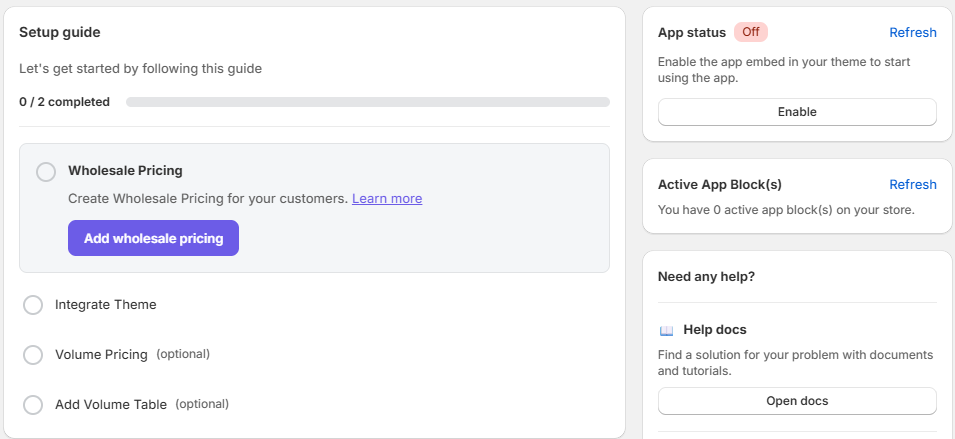
Once installed, you’ll land on the Setup guide dashboard. You’ll notice that App status is set to Off in the top-right corner.
Step 2: Activate the App Embed
Before creating any rules, you need to activate the Wezy app embed in your Shopify theme. You can do this in two ways:
Option A: From the Wezy dashboard (recommended)
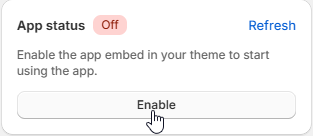
Simply click the Enable button next to App status in the top-right corner of the dashboard.
Option B: From the Shopify theme editor
- From your Shopify admin, go to Online Store → Themes
- Click Customize on your active theme
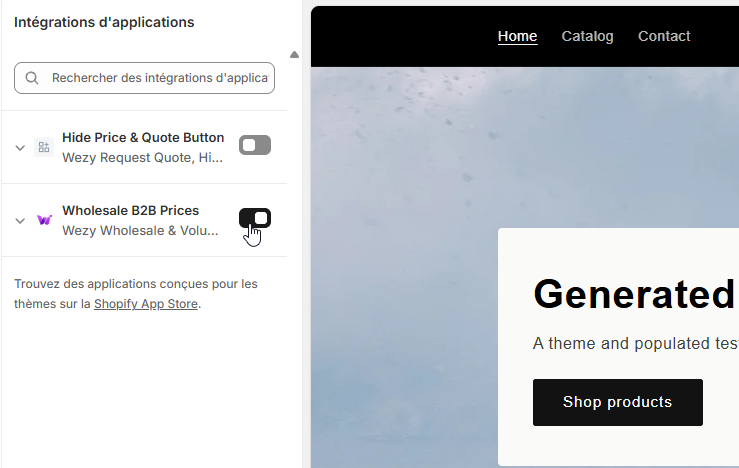
- In the theme editor, click App embeds (toggle icon in the left sidebar)
- Find Wholesale B2B Prices by Wezy and toggle it ON
- Click Save
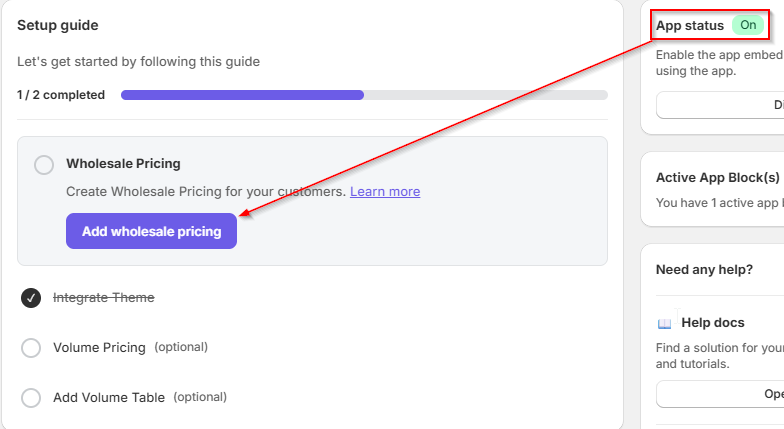
Once activated, the dashboard will confirm the change. The App status will switch to On (green badge) and the Integrate Theme step will be marked as completed.
Why is this step important? The app embed is what enables the wholesale pricing widget to display on your product pages. Without it, your rules will still work at checkout but customers won’t see the discounted prices while browsing.
Step 3: Create Your First Wholesale Pricing Rule
From the Wezy dashboard, click Add wholesale pricing in the setup guide, or navigate to the B2B Wholesale Rules tab and click + Create Rule.
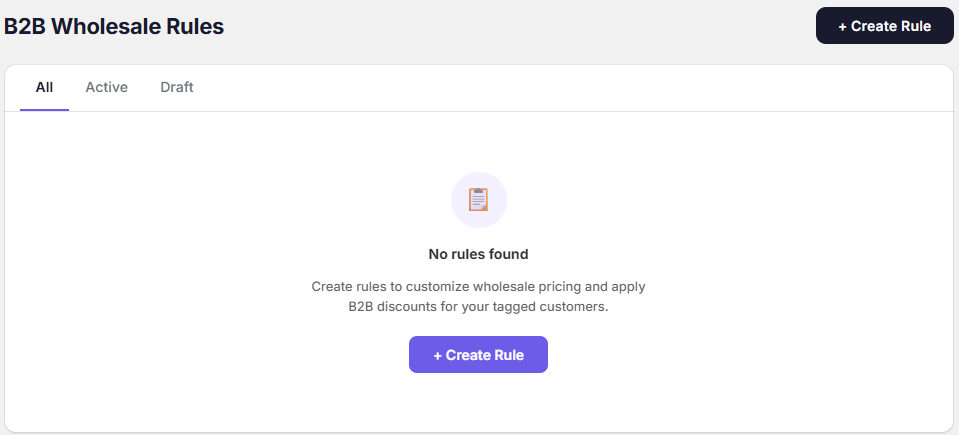
This opens the rule editor where you can configure your wholesale discount in a few clicks.
Step 4: Configure Your Wholesale Rule
The rule editor lets you configure everything in one form:
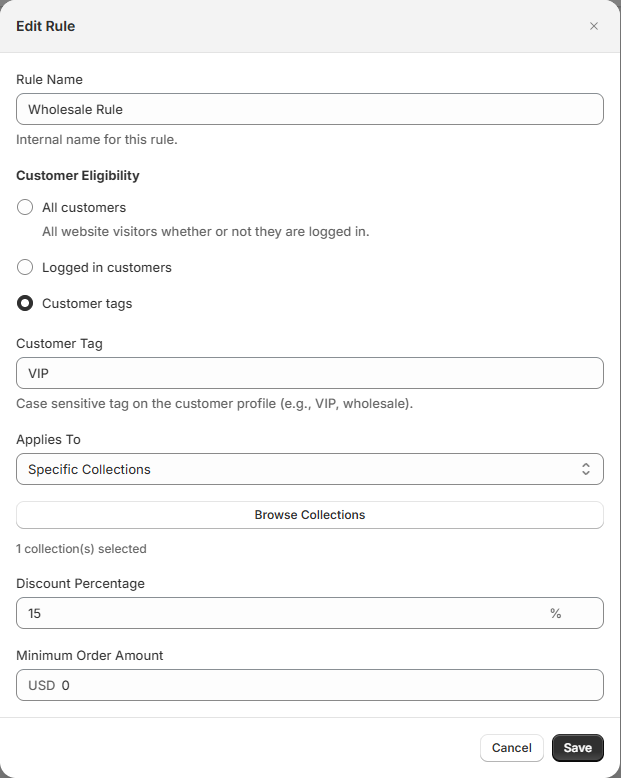
Here’s what each field does:
Rule Name: an internal label for your own reference (e.g., “Wholesale Rule”).
Customer Eligibility: choose who gets the discount:
- All customers: everyone who visits your store, logged in or not
- Logged in customers: any customer with an account on your store
- Customer tags: target specific buyer groups using Shopify’s customer tags (e.g.,
VIP,wholesale,B2B). Tags are case-sensitive and must match exactly.
Applies To: select which products are eligible for the discount:
- All Products: the discount applies store-wide
- Specific Products: pick individual products
- Collections: apply to one or more collections
- Product Tags: target products by their Shopify tags
Discount Percentage: the percentage off for this rule (e.g., 15%).
Minimum Order Amount (optional): set a minimum cart value in your store currency to qualify for the discount (e.g., USD 500).
Minimum Order Quantity (optional): require a minimum number of items in the cart before the discount kicks in.
How to tag customers in Shopify: Go to Customers in your Shopify admin, open a customer profile, and add tags in the Tags field. You can also bulk-tag customers using Shopify’s customer segments.
Step 5: Activate and Test
Click Save to create your rule. It will appear in your Wholesale Rules list with all the details visible at a glance.
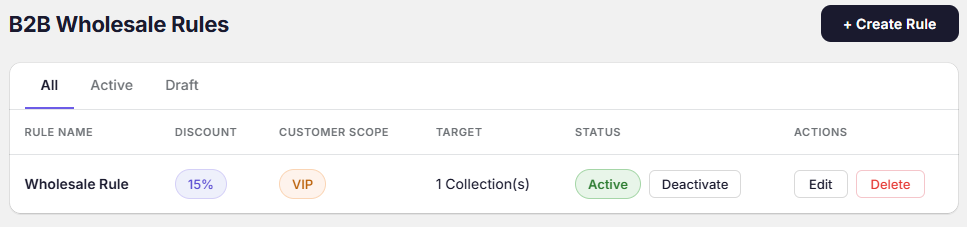
Make sure the rule status shows Active. If it’s in Draft mode, click Activate to enable it.
Now test it on your storefront:
- If you used Customer tags, make sure your test customer has the correct tag in the Shopify admin. If you used Logged in customers, any account will work.
- Log in to your storefront as that customer
- Visit a product page, you should see the discounted price displayed
- Add to cart and proceed to checkout to verify the discount applies
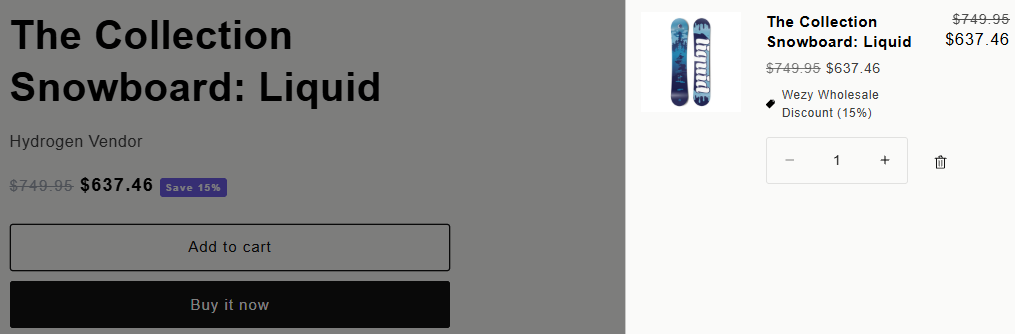
The buyer can see the wholesale price on the product page through the app embed, while the discount calculation is handled through Shopify’s commerce logic. Test both the storefront display and the final cart/checkout result whenever you change a rule or theme.
Frequently Asked Questions
Can I create different discounts for different customer groups?
Yes. Create multiple rules with different customer tags or eligibility settings. For example, a 15% rule for B2B tagged customers and a 25% rule for VIP tagged customers. You could also have a 5% rule for all logged-in customers and a higher discount for tagged wholesale accounts. Each rule operates independently.
Do customers see the discount before checkout?
With the app embed activated (Step 2), a pricing widget displays the discounted price directly on your product pages. At checkout, the Shopify Function applies the actual discount.
What about volume pricing (quantity-based discounts)?
Volume pricing is available as a separate feature in the app with its own dedicated setup. We’ll cover that in a dedicated tutorial.
Does this work with Shopify’s native B2B features?
Yes. Shopify B2B is available across Basic, Grow, Advanced, and Plus plans. Native B2B now includes companies, catalogs, quantity rules, volume pricing, payment terms, and other features, with plan-specific limits. Wezy is most useful when you want a simpler tag-based pricing workflow, app-managed wholesale rules, and a product-page pricing experience alongside Shopify’s native B2B tools. See Shopify’s current B2B features by plan before choosing your setup.
What’s Next?
- Learn how to sell wholesale on Shopify with a complete strategy
- Compare Shopify native B2B vs apps to find the right stack
- Understand what Shopify Functions are and why they matter
- Explore 5 B2B pricing strategies to maximize revenue
- Discover RFQ vs fixed pricing for your B2B model
- Check out the pricing page to see which plan fits your needs
Happy selling! 🚀