JSM setup guide
How to Add Customer Voting to Your JSM Portal
Let customers support existing requests with one click from your Jira Service Management portal. Your team then compares votes and organizations in Jira, with your current JSM permissions unchanged.
 Wezy Team Updated October 30, 2026 4 min read
In short
Install Wezy Customer Voting from Atlassian Marketplace, choose which request types and statuses can receive votes, then open a request for voting. Customers who can already see that request vote in one click from the portal, and your team reads the result in Jira.
In this guide
A customer wants to export service requests to CSV. They find that existing request in the portal and choose Vote to show that the improvement matters to them. Your team sees the demand in Jira.
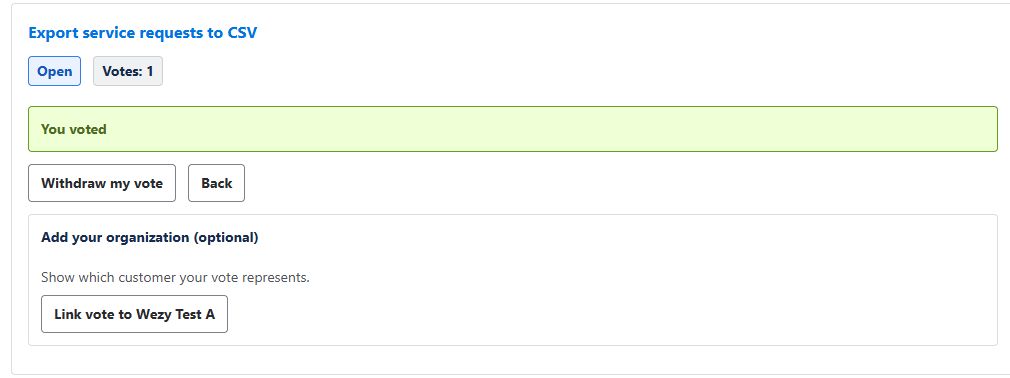
- Choose a requestThe title explains the improvement.
- Vote onceThe vote supports that existing request.
- See your choiceAfter the vote is saved, Wezy shows You voted. Linking an organization is optional.
Before you start
- A company-managed JSM Cloud project. Team-managed projects, Data Center, Atlassian Government Cloud and Isolated Cloud are not supported.
- The right administrators. Someone who can install Atlassian apps on your site, and a project administrator.
- A test customer account that can already open one request in the portal. An agent's view in Jira does not show the customer journey.
Why an app? Jira's built-in Vote action is used from the Jira work item view. Atlassian's suggestion to let customers vote on the portal, JSDCLOUD-1743, was still under review on 23 October 2026.
Set up customer voting in 5 steps
-
Site admin
Install Wezy from Atlassian Marketplace
Open the Wezy Customer Voting listing, choose Try it free and follow Atlassian’s installation flow for your site. Atlassian shows the permissions, editions and trial terms before you confirm.
Try it free on Atlassian Marketplace Installing requires the appropriate Atlassian administrator permissions on your site.Then open your JSM project, go to Project settings → Wezy Customer Voting and check that the settings load.
-
Project admin
Choose which requests can receive votes
In Voting rules, turn on Enable voting in this project, then choose:
- the allowed request types, for example Feature request;
- the workflow stages: New, In progress or both;
- the Jira statuses allowed in those stages.
Finish with Save settings. A changed switch is only a draft until you save. Completed requests cannot receive new votes.
TipStart narrow: one request type and one status make your first test easy to check.

-
Agent
Open a request for voting
Open an existing request in Jira, then the enrollment panel for Wezy Voting. Review what customers can read and who the request is shared with, tick I have reviewed this request’s content and JSM sharing settings, then choose Open this request for voting.
Saving the rules does not open every request: your agents choose. Opening voting never shares a request with new people.

-
Customer
Customers vote in one click
Customers who can already access the request vote from the Wezy list in the portal or from the request details: Vote, then You voted. No organization choice is needed first. See the customer view
After voting, they can link the vote to their organization. It never adds a second vote. Back closes this panel without withdrawing the saved vote; Edit my vote opens it again. Each account has one active vote per request and can use Withdraw my vote at any time.
-
Your team
Read the results in Jira
Use View the project results, or open the request’s Wezy Customer Demand panel. You see active votes, organizations represented and a demand score, so you can compare requests side by side.
Votes are a demand signal, not a verdict. Weigh them with impact, effort and constraints. How to prioritize JSM feature requests

Export service requests to CSV. Sample data: 7 votes, 5 organizations and 4 recent votes give a Standard score of 30.


Try it on your own portal
Install Wezy, open one request for voting and see the first vote in Jira.
If something doesn’t show up
A request is missing from the portal list
No organization is offered after voting
An error appears after clicking Vote
Jira fields or JQL don't show the vote yet
Frequently asked questions
Does installing Wezy make my requests visible to customers?
Do customers need to choose an organization?
Does the most-voted request win?
Which JSM setups are supported?
Where can I see prices and trial terms?
Published by the team behind Wezy Customer Voting. Product capabilities are linked to their official documentation; worked examples are illustrative.
Let customers vote on your JSM portal.
Install Wezy from Atlassian Marketplace, open one request for voting and see the first vote in Jira.